Your first chart
A birth chart needs three things: the date, the local time and the place of birth. The “Birth chart” form sits at the very top of the page.
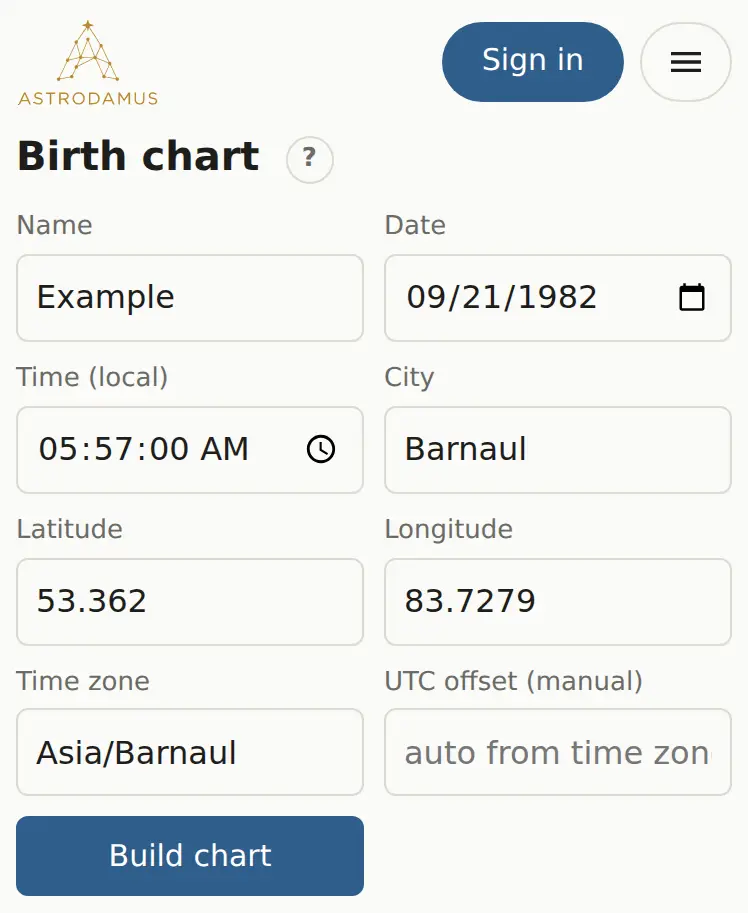
Build a chart
- Type whose chart it is in “Name”. It's optional; the name shows up in report headers and in your saved charts list.
- Pick the birth date in “Date”.
- Enter the clock time at the birthplace in “Time (local)”, as written on the birth certificate. Seconds are optional.
- Start typing the city in “City”, in English or Russian. Pick a suggestion with the mouse, or with the arrow keys and Enter.
- Check that “Latitude”, “Longitude” and “Time zone” have filled in.
- Click “Build chart”.
You'll see an info line (UTC offset, Universal Time, Julian day), the wheel and the tables. All chart data is written into the page address after the # sign. Bookmark that link or send it to someone, and it opens the same chart.
Form fields
| Field | What to enter |
|---|---|
| Name | Any label, or leave blank |
| Date | The birthday on the local calendar |
| Time (local) | Hours and minutes, plus seconds if you have them |
| City | A city name; suggestions come from the GeoNames atlas (cities of 15,000+ people) |
| Latitude, Longitude | Decimal degrees. North and east are positive, south and west negative |
| Time zone | An IANA zone name such as America/New_York or Asia/Barnaul |
| UTC offset (manual) | Leave blank. Fill it in only if the zone came out wrong |
If your town isn't in the suggestions, pick the nearest large city and then correct latitude and longitude by hand (any map service shows them). Keep the neighbor city's time zone.
Example
The sample chart in this guide: September 21, 1982, 5:57 AM, Barnaul, Russia (53.362, 83.7279), zone Asia/Barnaul. After “Build chart”, the “Planets” table shows the Sun at 27°36' Virgo in the 2nd house and the Ascendant at 4°13' Virgo.
If you don't know the birth time
Use 12:00. Planet positions barely change (the Moon moves 6 to 7° at most), but the Ascendant, MC and houses become guesswork. Skip the houses and everything built on them: profections, lots, directions to the angles. “Ready-made reports” has a checkbox for this case, “I don't know my exact birth time”, and the report leaves out the house paragraphs.
You can narrow the time down from life events: see Rectification.
Next steps
- Time zones and daylight saving: why a yellow warning sometimes appears.
- The chart wheel: reading the circle and opening interpretations.
- Planets, houses, aspects: the tables under the wheel.